How to change domain name contacts through domain name control panel ?

How to change contact details of a domain name through domain name administration control panel ?

1. Login to domain name control panel

2. Select List all orders from "Domains" menu
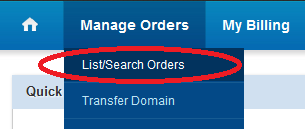
Domains > List all orders

3. You can see a list of domain names registered by you. If the list is long, you can use search option available on left side to get only required domain listed. Click on the listed domain name to access management area.

List of Orders

4. In Domain name management area, click "Contact Details"
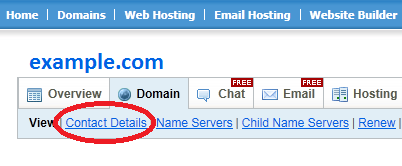
Contact Details

5. To change an existing contact details, click "Edit Existing Contact". To use a new contact informaiton proceed to step 6.

Use a new contact detail or Edit existing contact details

6. If you are using new contact details other than existing, click "Use Another Contact". Then in the pop-up window, click "Add New" option.

Add new contact

7. Enter new contact details in pop-up window and click "Add" button.

New contact details window

8. Finally click "Modify Contact Information" button

Modify Contact Information

9. Veify Contact information change at this link: http://domaincp.cyberhost.in/whois.jsp?null

  • 12 Users Found This Useful
Was this answer helpful?

Related Articles

Why you should renew Domain names before expiry date ?

We are strongly suggest to domain owners renew the domain in time to keep it safe with you. Once...

How do I change name servers of my domain name?

Login to domain name control panel. Go to "Domains" menu. Click "List last 10" You can see...

Is web hosting included with my Domain Name registration?

Web hosting is an additional service to Domain Name registration.

How can I make changes to my Domain Names?

Go to the link provided along with your domain registration information. You must login with your...

How do I know if I have registered a Domain Name successfully?

You will receive a confirmation email, confirming your registration details and customer ID,...