Why I get socket errors during FTP ?

In your FTP client's settings, go to connections option. Each FTP client has something like this. Then look for an option that says "pasv" or "passive" FTP, change the setting to the opposite (active) that it is currently set to. That should solve all the problems described.

Settings for FileZilla FTP Client
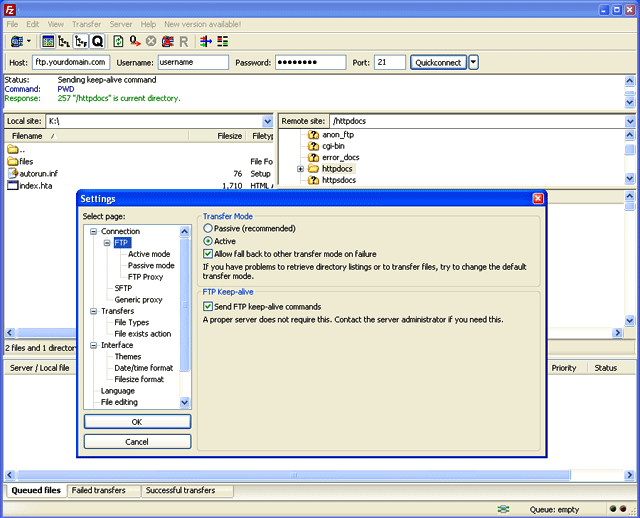
Filezilla settings for active mode transfer

  • 12 Users Found This Useful
Was this answer helpful?

Related Articles

What is FTP ?

FTP stands for File Transfer Protocol. As the name suggests, FTP is used to transfer files...

How do I use FTP ?

First of all you need to have a FTP client application. Some popular ones are FileZilla,...

How do I show hidden files in FTP?

Configuring your FTP client to show hidden files is a process that differs significantly from...

How to configure SFTP in FileZilla to connect to Linux hosting account?

FileZilla is a free ftp client which can be used to upload/download files to/from your hosting...