How do I change password for an e-mail ID in Plesk ?

To change password of an e-mail ID follow the steps mentioned below.

1. Login to Plesk control panel

2. Click the "Mail" Tab
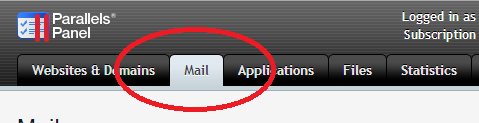
3. In the next page that opens up, click the e-mail ID for which you need to change password.

4. In the page that opens, you can find two text fileds named "Password" and "Confirm password". Enter new password in those fields. Then click "OK" button.

Now you will be able to login with new password.

  • 28 Users Found This Useful
Was this answer helpful?

Related Articles

How do I set file/folder permission with Plesk file manager

To set file / folder permission for Plesk panel hosting account1. Log in to Plesk2. Click "Files"...

How do I enable webmail in Plesk?

1. Login to plesk control panel.2. Click on the domain you want to enable Webmail3. Click on the...

How do I set my website default page using Plesk?

1. Login to Plesk Control panel2. Click the "Virtual Directories" 3. Virtual directories section...

How to view space usage of hosting account in Plesk?

Login to your plesk control panel account. 1. Select Statistics > Summary report 2. Select...

Unable to access website using www

Why I am unable to access website when prefixed my domain name with www This issue occurs, when...