
To change password of an e-mail ID by the e-mail ID user through plesk control panel, follow the steps mentioned below.
1. Access control panel login page using URL format: http://domain.com:8880/ , where domain.com has to be replaced with actual domain name.
2. Use Login as full e-mail ID and current known password to login to account
3. Click "Preferences" icon to access password change area.
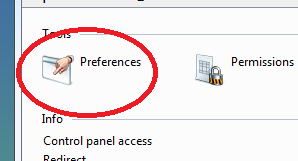
4. You can find two text boxes named "New password" and "Confirm password", put new password in those text boxes and click OK button.
